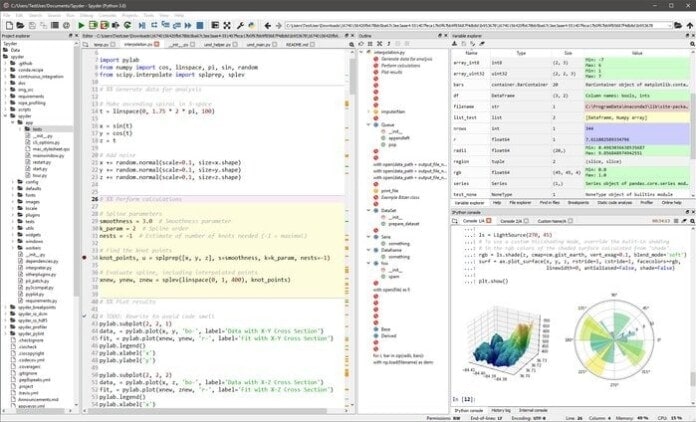
Are you looking for an IDE for data science? Well, your search ends here. Here comes Spyder- the scientific Python IDE for data science. It’s an open source cross-platform IDE based on Python. Its primary focus is data analysis, research and scientific package creation along with Python development. You may find a lot of IDEs, but if your primary function is data science, Spyder will be perfect for you in all ways.
IPython, Matplotlib, SciPy, NumPy- all are some fundamental libraries for data science. Sypder integrates them all. It’s so user-friendly and comfortable that it will take minimum time to be a pro user. Besides, with Spyder, you can switch between R Programming language or Matlab and Python anytime you want. That’s because its interface is almost like RStudio. Spyder provides its users with toggle-able sections, customizable layouts and interactive options.
Important Features
- Allows user contribution to the Spyder source code.
- Available for Windows, macOS, and Linux.
- Supports multi-languages.
- Completes code automatically.
- Supports entire IPython functions and commands.
- Re-imports modified source automatically.
- Variable and file explorer.
- Syntax highlighting with customization.
- APIs and plugins help to support function extensions.
- Interactive shortcut cheat sheet, tutorial, and tour for new users
- Provides the automatic link to Help
- The automatic variable is clearing and debugging.
- Available Keyboard shortcuts editor with full customization.
- Executes interactively.
Install on Ubuntu Linux
It’s easy to install in Ubuntu Linux. Run the following command:
sudo apt-get install spyder
Moreover, If you have different Linux distros, then follow the official installation page for detail instruction.
Final Words
I’m not saying that Spyder is the only best IDE for Linux. But, it can be the perfect IDE for you. Don’t rush. Give it a chance, and then you will understand what I’m trying to say here. It’s effortless to use even for a beginner. It also provides the tutorial for the beginners. So, don’t panic while using this IDE at all.
Do you like this article or is there any suggestion you have? Just go to the comment section below and share your thoughts with us. And also you can share the article on social media if you like it.