Nowadays, the Chromebook is becoming popular among students and professionals. Earlier time, users who used to use Microsoft Office now use Google Docs on their Chromebooks. So it’s important to convert MS Office Files into Google Docs compatible files for users who want to use Chromebook as a full-time Machine.
I will show how to convert MS Office Files into Google Docs in your Chromebook. You can do it one file at a go or all the files combined. Google Docs supports a drag-drop function for converting MS Office Files.
Step-1
Launch the Google Drive from the bottom app launcher menu of your Chromebook. You can also open Google Drive from the Chrome browser Extension Manager.

Step-2
Now, you have to go to the settings menu.
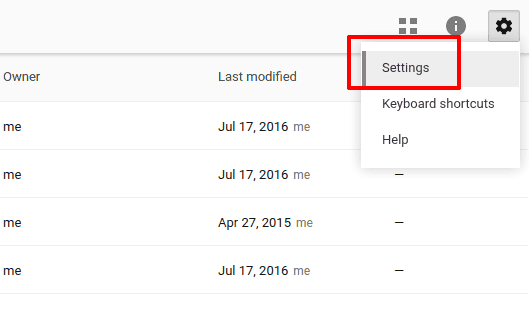
Step-3
From the settings menu, Go to the general tab and ensure that the checkmark is selected on ” Convert Uploads”
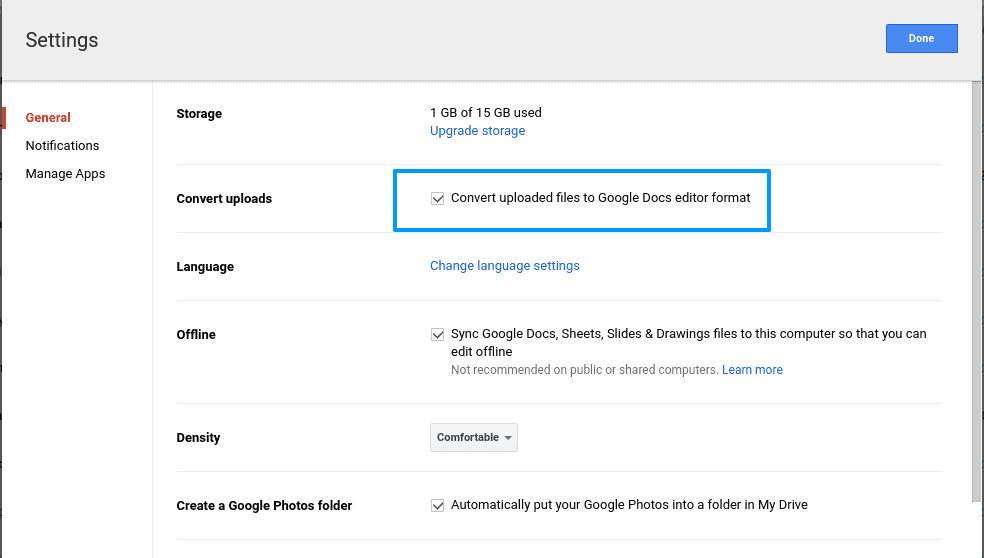
Step-4
Now it’s time to drag and drop a file or a folder of files from the Desktop into Google Drive.

Step-5
An uploading progress bar will appear to show the files are uploading and converting. Depending on how many files are uploaded from the desktop into Google Drive, this will take a moment.

Final Result
After successful completion, you can find all the docs on your Google Drive. You can see your file’s “.doc” extension on the drive.
This is how you can quickly convert all types of Microsoft Office files ( MS Word, MS PowerPoint, MS Excel ).
Do you like this simple tutorial? Feel free to share your experiences and suggestions about your Chromebook and Google Apps in the comment below.



Great tutorial! I’ve been trying to convert my MS Office files to Google Docs format for a while now, and this post made it so much easier. I especially appreciated the step-by-step instructions and the screenshots. It’s amazing how much time and effort this can save us. Thanks for sharing!