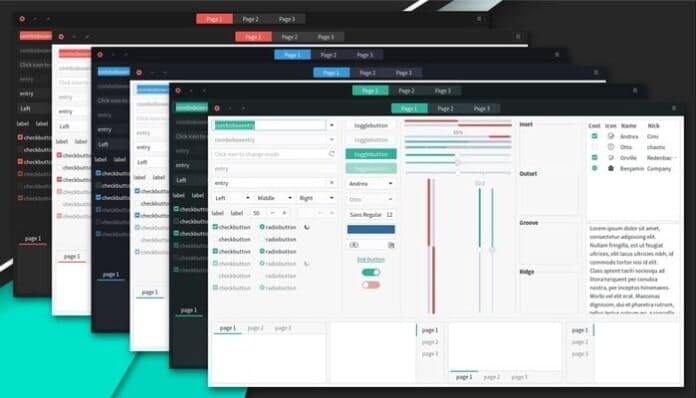
Matcha Gtk Theme is a modern and flat design theme inspired by the Arc gtk theme. This amazing dark theme supports GTK 3, GTK 2, and Gnome-Shell. This theme is designed to integrate seamlessly with GTK 3 and GTK 2-based desktop environments like Unity, Pantheon, Mate, Gnome, Budgie, XFCE, etc.
It provides a friendly interface with eye caching transition and animation. It comes with a total of 6 variations. Those are red, blue, sea green, dark red, dark blue, and dark sea green.
Recommended Post: Top 28 Best Ubuntu Themes That Will Blow Your Mind
Matcha GTK theme requires GTK+ 3.20 or later and GTK2 engines. So, make sure that you have installed any of those engines before installing this theme. But if you don’t have one, don’t worry; I will show you how to install all those prerequisites on various Linux distros, including Ubuntu, Linux Mint, Fedora, Arch Linux, etc.
Screenshot


Install Matcha Gtk Theme
Now it’s time to install this amazing GTK theme on Ubuntu or any other Linux distros. Check how to install and apply Theme files on Linux, in case you don’t know it.
Download Theme files from gnome-look.org
Note: The features mentioned here are not all-inclusive. The features mentioned are compiled either from their respective official websites or from my personal experience using them.
Recommended Post: Top 15 Best Gnome Shell Themes for Your Gnome Desktop
PS: If you liked this post on installing the Matcha GTK Theme on Linux, please share it with your friends through social networks or simply leave a reply below. Thanks.