In the modern digital landscape, convenience often comes at the steep price of personal privacy. Over the last two decades, the internet has become increasingly centralized, dominated by a handful of massive technology corporations often referred to as “Big Tech.” Companies like Google, Microsoft, and Meta provide incredible, ostensibly “free” services. However, the true currency exchanging hands is user data.
Every search query, location ping, email sent, and file uploaded is meticulously categorized, analyzed, and monetized to build comprehensive psychological and behavioral profiles. These profiles are then used to serve highly targeted advertising or train massive artificial intelligence models.
Fortunately, a growing movement of privacy advocates, open-source developers, and non-profit organizations are fighting back. They are building a parallel ecosystem of software and services designed with a fundamentally different philosophy: privacy by design, zero-knowledge architecture, and user sovereignty.
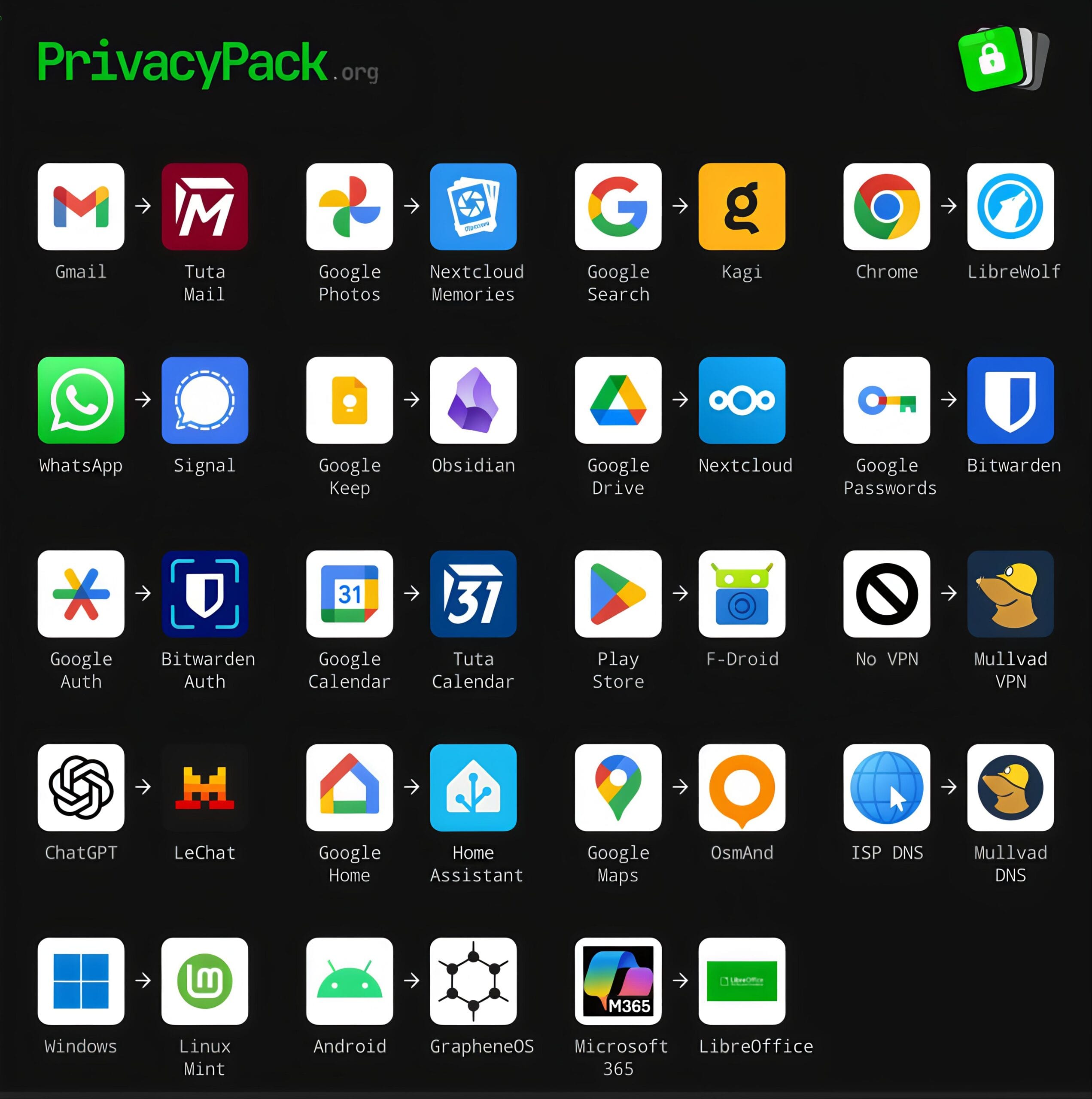
The visual guide from PrivacyPack.org serves as an excellent roadmap for “de-googling” and moving away from invasive corporate ecosystems. This article provides an in-depth exploration of these vital alternatives, breaking down why you should switch and what makes the privacy-focused replacements superior.
Phase 1: Rethinking Communication and Web Exploration
The most immediate way tech giants monitor our lives is through our daily communications and web browsing habits.
Gmail to Tuta Mail
Google’s Gmail revolutionized email with massive storage limits, but it did so by establishing a precedent of scanning email contents to serve context-aware advertisements. While Google claims to have scaled back this practice for ad-targeting, your inbox remains inherently unencrypted on their servers, meaning the company (or governments with subpoenas) can read your messages.
Tuta Mail (formerly Tutanota) represents a hard pivot. Based in Germany, a country with strict data protection laws, Tuta offers end-to-end encryption for your entire mailbox. Not only are the contents of your emails encrypted, but so are the subject lines and your address book. Because Tuta utilizes zero-knowledge architecture, they possess no way to read your communications.
Chrome to LibreWolf
Google Chrome dominates the browser market, giving Google unprecedented power over web standards. Chrome is inherently tied to Google accounts, tracking browsing history, bookmarks, and extending the company’s advertising reach. Furthermore, Google’s push for “Manifest V3” severely limits the effectiveness of content blockers.
LibreWolf is an independent, open-source fork of Mozilla Firefox designed to maximize privacy and security out of the box. It actively strips out all telemetry (data sent back to the developers), disables experimental features that compromise privacy, forces strict tracking protection, and comes pre-installed with uBlock Origin, the industry standard for blocking malicious scripts and advertisements.
Google Search to Kagi
The fundamental flaw with Google Search is its business model. Because it relies on advertising revenue, search results are often heavily manipulated to prioritize sponsored links, SEO-optimized spam, and Google’s own properties over genuinely useful information.
Kagi represents a radical, refreshing alternative: a paid search engine. By charging a modest subscription fee, Kagi aligns its incentives entirely with the user. You are the customer, not the product. Kagi delivers incredibly fast, high-quality, and ad-free search results, complete with tools to manually uprank or downrank specific domains, ensuring you have total control over the information you consume without being tracked across the web.
WhatsApp to Signal
While Meta’s WhatsApp does feature end-to-end encryption, the company still harvests vast amounts of “metadata.” Metadata includes who you are talking to, when you are talking, your location, and your group affiliations, information often more valuable than the message content itself.
Signal is the gold standard for secure messaging. Operated by a non-profit foundation, Signal uses a state-of-the-art, open-source encryption protocol. More importantly, Signal implements “sealed sender” technology, meaning the service does not even know the identity of the person sending a message. It collects virtually zero metadata, ensuring your private conversations remain exclusively between you and your recipient.
Phase 2: Securing Productivity, Organization, and Cloud Storage
We entrust tech companies with our personal thoughts, schedules, and memories. Reclaiming this data requires a shift toward self-hosted or locally managed solutions.
Google Drive to Nextcloud
Google Drive offers seamless cloud storage but heavily integrates your files into Google’s scanning algorithms, posing risks to intellectual property and sensitive personal documents.
Nextcloud is an incredibly powerful open-source platform that allows you to build your own personal cloud. You can host Nextcloud on a server in your own home (like a Raspberry Pi) or rent server space from a trusted, privacy-respecting provider. Nextcloud offers file syncing, sharing, and collaboration tools that rival Google Drive, but you retain 100% ownership and sovereignty over your physical data.
Google Photos to Nextcloud Memories
Google Photos leverages highly advanced machine learning to categorize your life, employing facial recognition and object detection on your most intimate moments. This trains Google’s AI models using your family photos.
Nextcloud Memories is a self-hosted alternative that plugs directly into a Nextcloud server. It provides the same beautiful, timeline-based gallery experience for your photos and videos, and can even perform facial recognition and organization but it does so entirely locally. Your biometric data and personal memories never leave the hardware you control.
Google Keep to Obsidian
Note-taking apps like Google Keep trap your ideas in a proprietary cloud ecosystem. If your account is ever suspended, you lose your thoughts. Obsidian flips this paradigm by operating as a “local-first” application. All of your notes are saved as simple, plain-text Markdown files directly on your computer or smartphone’s hard drive.
This guarantees that your notes will remain readable decades into the future, regardless of what happens to the Obsidian company. You own the files, and you can securely sync them between devices using end-to-end encrypted tools.
Google Calendar to Tuta Calendar
Much like email, your daily schedule reveals immense details about your life, from medical appointments to business meetings. Google Calendar deeply integrates this data to trigger location alerts and email reminders, mining your routine.
Tuta Calendar, integrated seamlessly with Tuta Mail, ensures that your schedule remains entirely private. Every event, notification, and attendee list is encrypted before it ever leaves your device, shielding your daily life from corporate surveillance.
Microsoft 365 to LibreOffice
Microsoft 365 Copilot (formerly Office) has transitioned into a subscription-based, cloud-first service that actively monitors usage statistics and requires constant internet verification.
LibreOffice is the premier free and open-source office suite. It includes equivalents for Word, Excel, and PowerPoint (Writer, Calc, and Impress). LibreOffice works entirely offline, requires no subscription, respects your privacy by omitting telemetry, and boasts excellent compatibility with legacy and modern Microsoft file formats.
Phase 3: Fortifying Identity and Network Infrastructure
Protecting your accounts and the actual network traffic flowing from your devices is paramount to digital hygiene.
Google Passwords to Bitwarden
Relying on Google Chrome’s built-in password manager is dangerous; it creates a single point of failure and locks you into the Google browser ecosystem. Furthermore, if your device is unlocked, anyone can often access your passwords.
Bitwarden is a dedicated, open-source password manager that uses strict zero-knowledge, end-to-end encryption. Your passwords are encrypted on your device using your master password before being synced to the cloud, meaning even Bitwarden’s engineers cannot access your vault. It works across every browser and mobile operating system seamlessly.
Google Auth to Bitwarden Auth
Two-factor authentication (2FA) is vital, but Google Authenticator historically lacked secure backups, meaning a lost phone resulted in lost accounts. While they recently added cloud sync, it simply feeds more security infrastructure to Google.
Bitwarden Auth (or integrating TOTP codes directly into a premium Bitwarden vault) provides secure, encrypted, and easily recoverable two-factor authentication, ensuring you never lose access to your digital life while keeping your security keys out of big tech’s hands.
No VPN to Mullvad VPN
Browsing the internet without a Virtual Private Network (VPN) allows your Internet Service Provider (ISP) to log every website you visit, data they frequently sell to third-party data brokers. Mullvad VPN is widely considered the most trustworthy VPN available.
Unlike competitors that require your name and email, Mullvad generates a random 16-digit account number. You can even pay for your subscription in physical cash through the mail to remain entirely anonymous. They operate with a strict, frequently audited no-logs policy, ensuring your internet traffic remains an unbreakable tunnel.
ISP DNS to Mullvad DNS
The Domain Name System (DNS) is the internet’s phonebook, translating website names into IP addresses. By default, your ISP handles these requests, allowing them to track your browsing even if website traffic is encrypted.
By switching your router or device to Mullvad DNS (or similar secure providers like Quad9), your DNS queries are encrypted using DNS-over-HTTPS (DoH). Furthermore, Mullvad DNS can be configured to act as a network-wide ad and malware blocker, stopping trackers before they even load.
Phase 4: Liberating the Mobile Ecosystem
Smartphones are the most invasive tracking devices ever invented, largely due to the operating systems and app stores that control them.
Android to GrapheneOS
Commercial Android devices come heavily burdened with Google Play Services, a deeply integrated framework with system-level access that tracks your location, app usage, and device metrics 24/7.
GrapheneOS is an incredible technical achievement: a completely open-source, privacy-and-security-hardened mobile operating system based on the Android Open Source Project (AOSP). It strips out all Google integration by default.
For apps that absolutely require Google Services to function, GrapheneOS offers “Sandboxed Google Play,” forcing Google’s frameworks to run as standard, isolated apps without special system privileges, giving you total control over what they can access.
Play Store to F-Droid
The Google Play Store tracks every app you install and uses proprietary algorithms to serve you applications laden with trackers and advertisements. F-Droid is an alternative app repository strictly dedicated to Free and Open Source Software (FOSS).
Every app on F-Droid has its source code publicly available for auditing. F-Droid aggressively warns users about “anti-features,” letting you know before you download an app if it contains tracking libraries, relies on non-free network services, or pushes advertisements.
Google Maps to OsmAnd
Google Maps provides exceptional navigation, but the cost is Google’s “Location History” a terrifyingly detailed, minute-by-minute map of everywhere you have ever been, which has increasingly been used in sweeping dragnet law enforcement requests.
OsmAnd is an incredibly robust, offline-first navigation app. It relies on OpenStreetMap (OSM), a collaborative, Wikipedia-style project to map the globe. With OsmAnd, you download entire regions or countries directly to your phone. It calculates routes and searches for points of interest using only your device’s processor, meaning your location data never leaves your pocket.
Phase 5: Reclaiming Operating Systems and Emerging Technologies
To achieve total digital sovereignty, you must address the core software running your computer, your home, and the AI tools you utilize.
Windows to Linux Mint
With the release of Windows 10 and 11, Microsoft transformed its operating system into a data-harvesting machine. Modern Windows includes pervasive telemetry, forced Microsoft account integration, advertisements in the Start menu, and invasive features like “Recall,” which takes constant screenshots of your activity.
Linux Mint is the perfect antidote. It is a free, open-source operating system designed to be highly familiar to Windows users. It contains zero telemetry, forces zero updates upon you, requires no online accounts, and respects the user as the owner of the hardware. With tools like Proton, even heavy PC gaming has become virtually seamless on Linux platforms.
Google Home to Home Assistant
Smart home ecosystems like Google Home or Amazon Alexa are essentially corporate microphones placed in your most intimate spaces. They rely heavily on cloud processing, meaning when you turn on a lightbulb, that command travels to a server hundreds of miles away before returning to your living room.
Home Assistant is an open-source home automation platform that acts as a local brain for your smart home. Running on a local machine, it allows thousands of different smart devices to communicate locally on your network. If your internet goes down, your smart home still works perfectly, and your usage data is never exported to a cloud server.
ChatGPT to LeChat
The explosive growth of Large Language Models (LLMs) has introduced a new privacy frontier. Tools like OpenAI’s ChatGPT save your prompts, conversations, and uploaded documents to train future iterations of their models, posing a massive risk for personal or corporate data leakage.
While running LLMs locally is the absolute best privacy choice, it requires expensive hardware. Alternatives like LeChat by Mistral offer a different approach. While still a cloud service, Mistral (a European company subject to GDPR) offers clearer data boundaries and enterprise options that explicitly forbid using user inputs for model training, representing a more responsible approach to cloud-based artificial intelligence.
The Journey Toward Digital Freedom
Looking at the extensive list provided by PrivacyPack.org can be overwhelming. Transitioning your entire digital life from the convenient but invasive grasp of Big Tech to a decentralized, privacy-respecting workflow is not something that happens overnight. It is crucial to view this not as a binary switch, but as a spectrum of digital hygiene.
Start with the easiest, highest-impact changes. Swapping Google Chrome for LibreWolf takes only a few minutes and immediately drastically reduces your web tracking footprint. Moving your passwords to Bitwarden enhances both your security and your independence from proprietary ecosystems. Once comfortable, you can tackle more substantial migrations, such as shifting your email to Tuta Mail or experimenting with a self-hosted Nextcloud server.
Every single app you replace is a victory for your personal autonomy. By adopting open-source, encrypted, and privacy-respecting tools, you are starving the surveillance capitalism machine of its fuel. You are voting for an internet that respects human privacy, champions open standards, and places the user back in control of their own digital destiny. The tools to secure your life already exist; all that is required is the decision to use them.